Code Coverage in EK9
EK9 automatically collects code coverage data during test execution. Coverage is always enforced - if your code falls below the 80% threshold, the test runner returns exit code 12 regardless of whether tests pass.
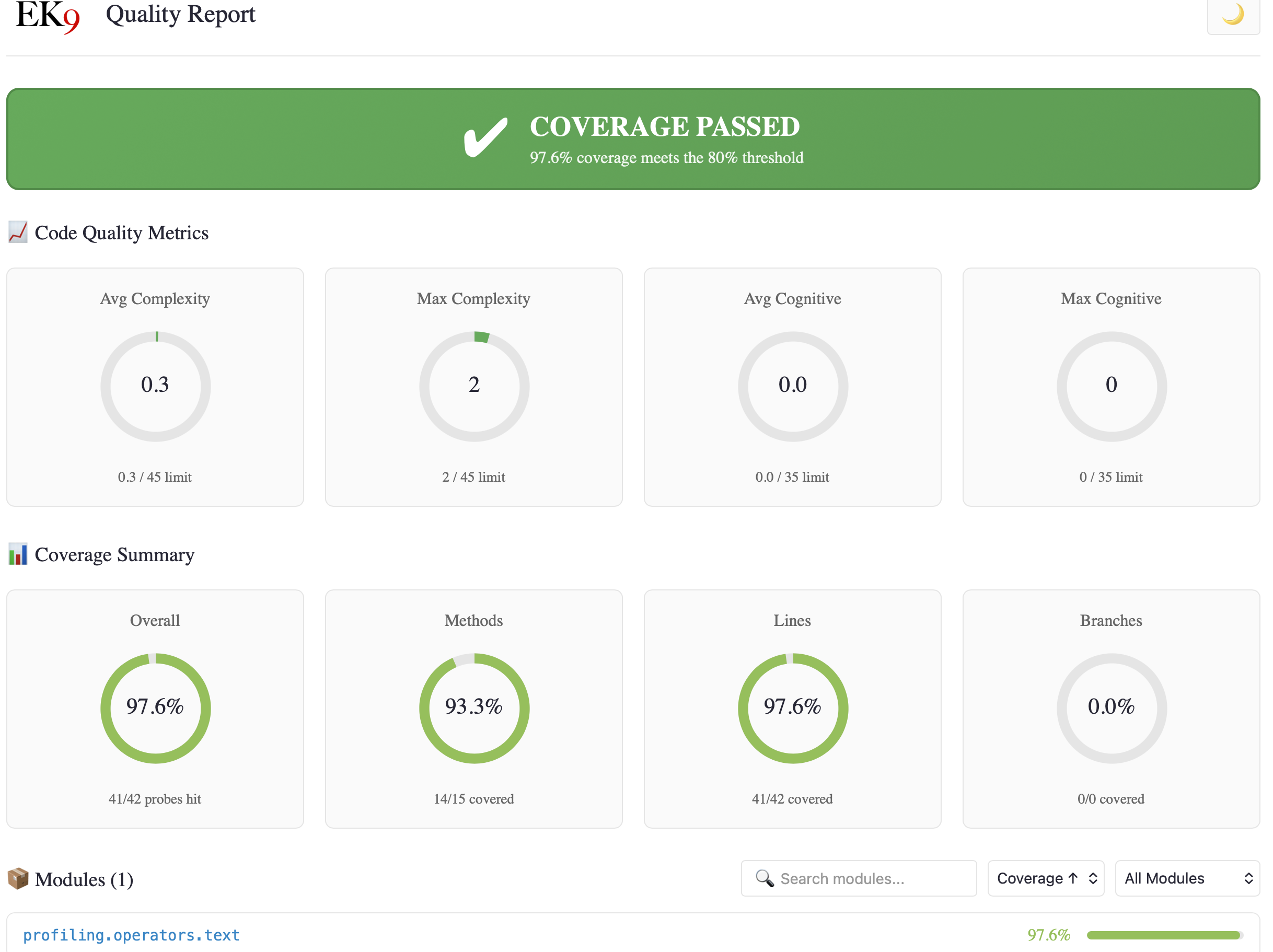
- Threshold Enforcement - Always-on 80% gate
- Coverage Output - Human, JSON, XML formats
- Verbose Coverage - Per-module breakdowns
- Quality Metrics - Complexity, cognitive load, readability
- HTML Reports - Interactive dashboards and source views
Threshold Enforcement
Unlike other test runners that treat coverage as optional, EK9 treats coverage as a first-class quality gate. Coverage probes are inserted at compile time at all control flow points:
- Function/method entry and exit
- Branch decisions - if/else branches, switch cases
- Loop body execution - for, for-range, while, do-while
- Exception handlers - catch/handle blocks
Coverage is always collected and enforced when running tests with -t.
If coverage falls below the 80% threshold, the test runner returns exit code 12 regardless
of whether a coverage report was requested.
$ ek9 -t main.ek9
[OK] PASS myapp.tests::AllTests [Assert] (5ms)

Summary: 1 passed, 0 failed (1 total)

❌ E83001: Code coverage 44.0% is below required threshold 80%
   Methods:  46.0% (23/50)
   Lines:    44.0% (37/84)
   Branches: 41.2% (14/34)

   Uncovered items:
     27 method(s)
     20 branch(es)

   Use -t4 or -t5 for detailed coverage report.

$ echo $?
12
This ensures CI/CD pipelines catch insufficient coverage even when developers don't explicitly request coverage reports. Tests passing is not enough - code must be tested.
Coverage Output Formats
Use -tC to display coverage results. The format follows the test output format:
ek9 -t -tC main.ek9         # Human-readable coverage summary
ek9 -t0 -tC main.ek9        # Terse coverage: Coverage: 87.5% (7/8)
ek9 -t2 -tC main.ek9        # JSON output to files
ek9 -t3 -tC main.ek9        # JUnit XML + JaCoCo XML to files
File Output for Machine Formats
When using machine formats (-t2 or -t3) with -tC,
results are written to files in the .ek9/ directory:
| Flags | Test Results | Coverage Results |
|---|---|---|
-t2 -tC |
.ek9/test-results.json |
.ek9/coverage.json |
-t3 -tC |
.ek9/test-results.xml (JUnit) |
.ek9/coverage.xml (JaCoCo) |
A human-readable summary with file paths is printed to stdout:
Summary: 3 passed, 0 failed (3 total)
Types: 3 assert
Duration: 13ms

Test results written to: .ek9/test-results.json
Coverage results written to: .ek9/coverage.json
The JaCoCo XML format (.ek9/coverage.xml) is compatible with coverage tools
like SonarQube, Codecov, and Coveralls.
Coverage JSON Format
{
  "coverage": {
    "methods": { "percentage": 100.00, "covered": 3, "total": 3 },
    "lines": { "percentage": 100.00, "covered": 5, "total": 5 },
    "branches": { "percentage": 100.00, "covered": 5, "total": 5 },
    "overall": 100.00,
    "probesHit": 5,
    "probesTotal": 5,
    "modules": {
      "my.module.tests": { "coverage": 100.00, "hit": 3, "total": 3 },
      "my.module": { "coverage": 100.00, "hit": 2, "total": 2 }
    }
  }
}
JaCoCo XML Format
<?xml version="1.0" encoding="UTF-8"?>
<!DOCTYPE report PUBLIC "-//JACOCO//DTD Report 1.1//EN" "report.dtd">
<report name="EK9 Coverage">
  <counter type="METHOD" missed="0" covered="3"/>
  <counter type="LINE" missed="0" covered="5"/>
  <counter type="BRANCH" missed="0" covered="5"/>
  <package name="my/module/tests">
    <counter type="BRANCH" missed="0" covered="3"/>
  </package>
</report>
Verbose Coverage (-t4, -t5)
For detailed analysis of what's covered and what's not:
ek9 -t4 main.ek9       # Verbose human coverage with item lists
ek9 -t5 main.ek9       # Same as -t4, plus writes coverage-verbose.json
The verbose format shows per-module breakdowns with specific items:
Coverage Report
==============

Overall Coverage: 75.0% (6/8 probes hit)

Module: myapp.core (100.0% - 4/4)
  Methods (2/2):
    [HIT] myapp.core::add
    [HIT] myapp.core::multiply
  Branches (2/2):
    [HIT] myapp.core::add:12 (IF_TRUE)
    [HIT] myapp.core::add:12 (IF_FALSE)

Module: myapp.utils (50.0% - 2/4)
  Methods (1/2):
    [HIT] myapp.utils::formatNumber
    [MISS] myapp.utils::parseNumber
  Branches (1/2):
    [HIT] myapp.utils::formatNumber:8 (IF_TRUE)
    [MISS] myapp.utils::formatNumber:8 (IF_FALSE)
With -t5, a detailed JSON file is written to .ek9/coverage-verbose.json
containing the same information in machine-readable format. See
JSON Output Schema for the complete field reference.
Code Quality Metrics
EK9's coverage system goes beyond simple line and branch counting. Every function is analyzed for code quality metrics that help identify complex, hard-to-maintain code.
For AI Assistants: See Metrics Reference for complete threshold tables, recommended actions, and workflow templates for iterative quality improvement.
Available Metrics
| Metric | Range | Description |
|---|---|---|
| Cyclomatic Complexity (CC) | 1-50+ | Number of linearly independent paths through code. Each if,
switch case, for, while, and exception handler
adds 1. Target: <10 per function. |
| Cognitive Complexity | 0-50+ | Mental effort required to understand code. Penalizes nesting, breaks in linear flow, and boolean complexity. Better reflects human comprehension than CC. Target: <15. |
| Nesting Depth | 0-10+ | Maximum depth of nested control structures. Deep nesting indicates code that should be refactored. Target: <4. |
| Statement Count | 0-100+ | Number of executable statements. Large functions are harder to test and maintain. Target: <20 per function. |
| ARI Readability | 1-12+ | Automated Readability Index measuring lexical complexity (identifier length and statement density). Lower = simpler to read. File-level metric. |
Compile-Time Enforcement: Many of these metrics are enforced at compile-time with hard limits for BOTH production and test code. See Code Quality for complete documentation of thresholds, error codes, and the rationale behind each limit.
Where Metrics Appear
Quality metrics are integrated throughout the coverage reports:
- Dashboard - Project-wide averages and maximums in the Code Quality Metrics panel
- Module pages - Per-module metrics summary with avg/max complexity
- Source views - Complexity badges on each function definition showing CC, Cognitive, and Nesting
- Attention panel - Flags functions with high complexity that need refactoring
Complexity Badges in Source Views
Each function in source views displays a complexity badge:
isNumeric()                                      CC:6
  -> text as String
  <- result as Boolean: false
  ...
Badge colors indicate severity:
- Green - CC ≤ 10: Good, maintainable complexity
- Orange - CC 11-20: Consider refactoring
- Red - CC > 20: High complexity, should refactor
Hover over badges to see full metrics: CC:6 Cog:1 Nest:1
Readability (ARI) Scores
The Automated Readability Index measures lexical complexity - how easy it is to read the words in your code (not understand the logic). Lower scores indicate simpler identifier names and statement structure.
ARI is shown per-file on module detail pages:
📖 Lexical Complexity
   formatters.ek9      6
   stringHelpers.ek9   6
   validators.ek9      3
Score interpretation:
- 1-6: Simple, clear identifiers
- 7-10: Moderate complexity
- 11+: Dense, consider simplifying names
Note: ARI is an informational metric with no compile-time enforcement. Domain-specific terminology often requires longer identifiers. See ARI Readability for complete documentation and domain considerations.
HTML Coverage Reports (-t6)
Generate comprehensive interactive HTML reports:
ek9 -t6 main.ek9       # Generate HTML coverage report
ek9 -t6p main.ek9      # HTML report with profiling (flame graph, hot function table)
This creates a full coverage website in .ek9/coverage/ with multiple
interconnected views.
Report Structure
.ek9/coverage/
├── index.html              # Dashboard with project overview
├── modules/                # Module detail pages
│   ├── myapp_core.html
│   └── myapp_utils.html
├── files/                  # Source file views
│   ├── __core_ek9.html     # Full source with highlighting
│   └── summary/            # File summary views
│       └── __core_ek9.html
├── coverage.css            # Styles with dark mode support
├── coverage.js             # Interactive features
├── EK9.png                 # Branding
└── ek9favicon.png
Dashboard (index.html)
The main dashboard provides a project-wide overview:
- Status Banner - Pass/fail with coverage percentage vs 80% threshold
- Package Info - Project metadata from package.ek9 (version, license, tags)
- Coverage Charts - Donut charts for Overall, Methods, Lines, and Branches
- Attention Panel - Card-based view of modules below threshold with:
- Severity indicator (🔴 critical <50%, 🟠 warning 50-79%)
- Coverage bar showing progress
- Probe counts and uncovered function counts
- Code Quality Metrics - Average/max complexity across all functions
- Module List - Sortable, filterable, searchable module breakdown
Module Detail Pages
Click any module to see detailed breakdown:
- Module Coverage Summary - Methods, Lines, Branches with mini charts
- Code Quality Metrics - Module-specific avg/max complexity
- Source Files - Coverage bars for each file in the module
- Lexical Complexity - ARI readability scores per file
- Functions - List of all functions with covered/uncovered status
- Uncovered Items - Specific branches and methods needing tests
Source Code Views
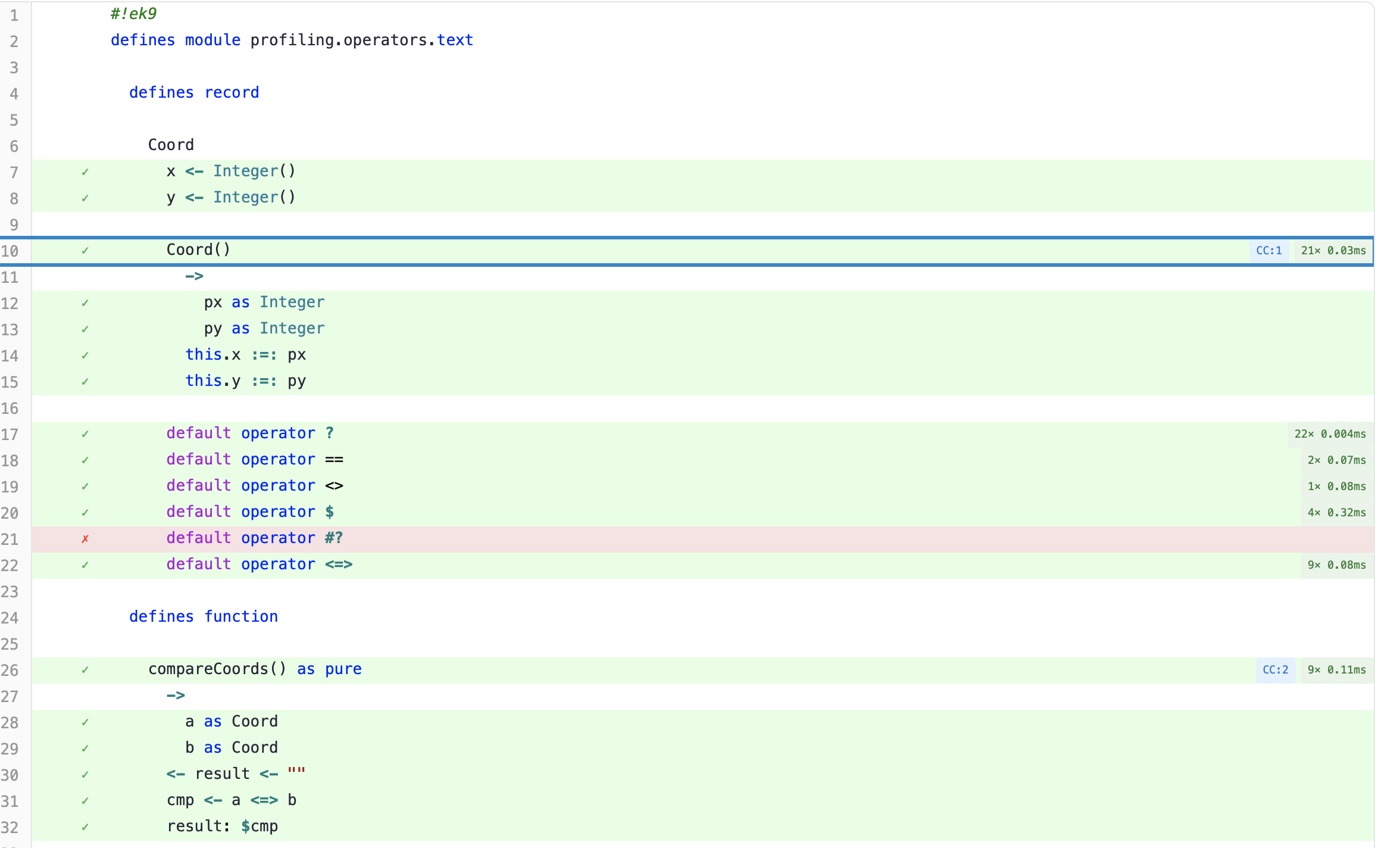
The most detailed view shows syntax-highlighted source with coverage data overlaid:
- Line Highlighting - Green background for covered lines, red for uncovered, gray for lines without coverage probes (declarations, comments).
- Hit Count Column - Shows a checkmark for covered lines and an X for uncovered lines, giving a quick visual scan of coverage gaps.
- Complexity Badges - Each function/method shows a colored badge with cyclomatic complexity (CC), cognitive complexity (Cog), and nesting depth (Nest). Badge colors: green (CC ≤ 10), orange (CC 11-20), red (CC > 20).
- Profiling Badges - When profiling is enabled
(
-t6p), each function shows call count and average execution time (e.g.,21× 0.03ms) alongside the complexity badge. Hover for full performance profile: total, self, min, max, and percentiles (p50, p95, p99). - Branch Indicators - BRANCH_TRUE, BRANCH_FALSE, and LOOP_BODY badges show which control flow paths were taken during testing.
- Filter Buttons - Toggle between showing all lines, only covered lines, or only uncovered lines to focus attention.
Interactive Features
- Dark/Light Mode - Toggle with moon/sun icon, persists across sessions
- Module Search - Type to filter modules by name
- Module Sort - By coverage (ascending/descending) or name
- Module Filter - Show all, failing only (<80%), or passing only
- Line Anchors - Direct links to specific lines (#L42)
Navigation Flow
Dashboard (index.html)
    │
    ├─╺ Attention Panel ╺ Module Page
    │
    └─╺ Module List ╺ Module Page (modules/myapp_utils.html)
                          │
                          ├─╺ Source File List ╺ File Summary
                          │                         │
                          │                         └─╺ Source View (files/__utils_ek9.html)
                          │
                          └─╺ Function List ╺ Source View (with line anchor)
Breadcrumb navigation allows moving back up: Source → Module → Dashboard
See Also
- Testing - Test types, assertions, test runner commands
- Profiling - Performance analysis, flame graphs, hot function table
- Test Generation - Mutation testing for assessing test quality
- Code Quality - Quality enforcement rules and thresholds
- Command Line - All flags and exit codes
- For AI Assistants - Machine-readable output schemas